Unity • C# • AI Systems • Third-Year Programming Systems for Games
Project AstroRot
A lunar zombie outbreak shooter about containing a failed moon-base test before the infection reaches Earth.
Overview
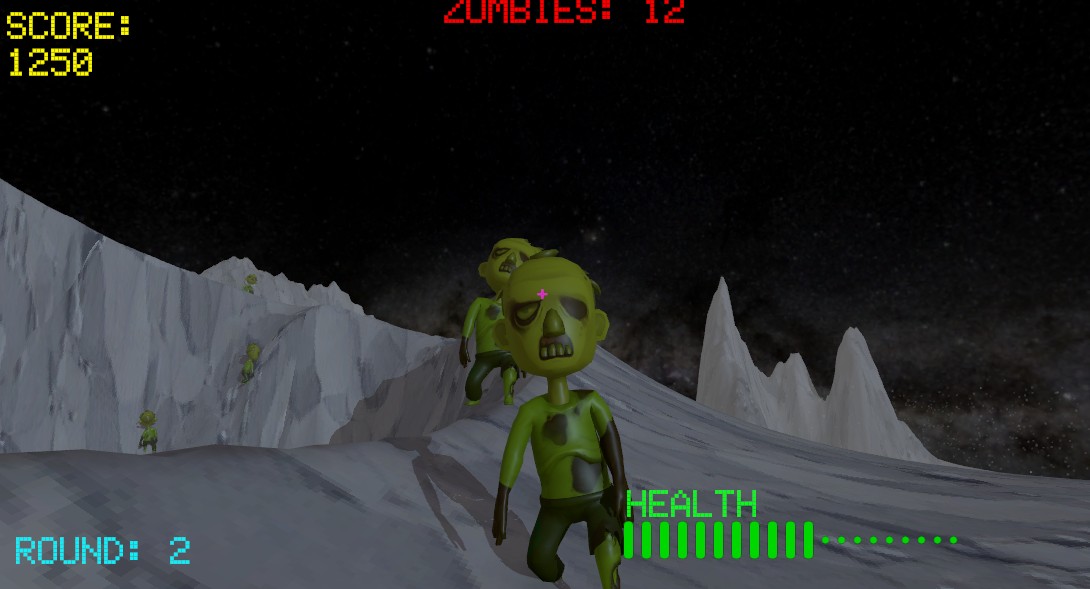
Project AstroRot started as a custom grid-based zombie AI prototype and developed into a playable first-person horde shooter. The game is set during a failed lunar testing programme, where a zombie outbreak has broken containment on the Moon. The player's role is to hold the site, destroy the infected, and prevent the outbreak from reaching Earth.
The project focuses on gameplay programming and AI systems rather than using Unity's built-in NavMesh. I built a runtime-sampled grid graph, A* pathfinding, perception-driven enemy behaviour, variant-based zombie setup, wave spawning, scoring, HUD feedback, player health, recoil, ADS weapon handling and a simple menu flow.
Core systems
Custom grid navigation
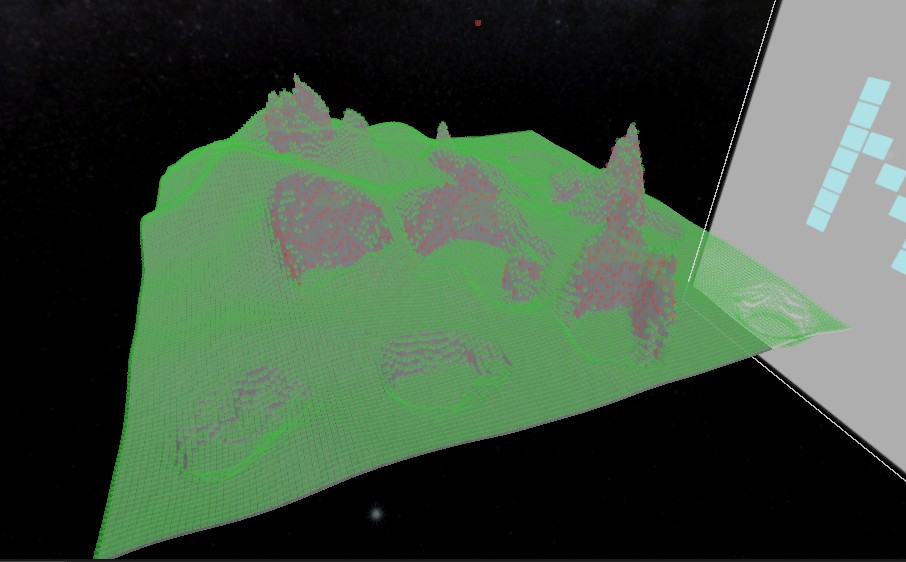
The navigation system uses a GridGraph component that samples the level at runtime. Each node stores a world position and walkability state, with traversal rules based on obstacles, slope limits, step height and jump height. This gave me more control than a default NavMesh and made the AI behaviour easier to explain, debug and extend.
// GridGraph.cs — nodes expose traversal edges for A*
public IEnumerable<Edge> GetEdges(Node n)
{
    foreach (var nb in GetNeighbours(n))
    {
        float heightDelta = nb.worldPos.y - n.worldPos.y;
        bool requiresJump = heightDelta > maxStepHeight;
        float baseCost = Vector3.Distance(n.worldPos, nb.worldPos);

        yield return new Edge
        {
            node = nb,
            cost = baseCost,
            requiresJump = requiresJump
        };
    }
}
A* pathfinding and movement
AStarPathFinder calculates routes over the sampled grid, while PathAgent follows those paths using Rigidbody movement. The agent can repath when goals move, draw debug paths, use a direct chase range close to the player, maintain a minimum player distance, avoid other zombies, and handle jumpable height changes under moon-style gravity.
// AStarPathFinder.cs — jump-aware path cost
foreach (var edge in graph.GetEdges(current.node))
{
    if (!edge.node.walkable || closed.Contains(edge.node))
        continue;

    float jumpCost = edge.requiresJump
        ? graph.jumpPenalty * jumpPenaltyMultiplier
        : 0f;

    float g = current.g + edge.cost + jumpCost;
    float f = g + Heuristic(edge.node, goal);
}
Perception-driven zombie AI
Zombies do not simply chase the player at all times. The PerceptionSensor checks field of view, line of sight, recent sight memory and sound events. Gunfire notifies nearby zombies through their hearing radius, and sound latching prevents constant firing from creating noisy repath spam.
// SimplePistol.cs — gunfire becomes a stimulus
Collider[] hits = Physics.OverlapSphere(soundPos, soundRadius, zombieSenseMask);

for (int i = 0; i < hits.Length; i++)
{
    PerceptionSensor sensor = hits[i].GetComponentInParent<PerceptionSensor>();
    if (sensor != null)
        sensor.HearSound(soundPos);
}FSM plus GOAP-inspired decision layer
The enemy logic is split between a traditional FSM and a higher-level decision controller. The FSM handles concrete states such as idle, chase, investigate, search and attack. The GOAP-inspired layer selects a current goal based on what the zombie knows, then chooses an allowed action such as chasing, investigating sound, searching the last seen position, melee attacking, ranged attacking or flanking.
// ZombieGoapController.cs — simplified goal selection
if (perception.CanSeePlayer)
    currentGoal = "EngagePlayer";
else if (perception.HeardRecently)
    currentGoal = "InvestigateSound";
else if (perception.HasRecentSight)
    currentGoal = "SearchLastSeen";
else
    currentGoal = "Wander";
Variant-based enemies
Enemy data is stored in ZombieVariantSO ScriptableObjects. Each variant can define health, move speed, attack range, score value, perception values, jump preference, ranged behaviour, flanking settings and a list of actions that the variant is allowed to use. This made it easier to create different enemy types without hardcoding every zombie separately.
- Shambler: slower pressure enemy using basic chase and melee actions.
- Sprinter: faster close-range enemy that makes waves more chaotic.
- Flanker: uses side-offset and serpentine-style movement instead of always taking the direct route.
- Spitter: keeps distance and uses ranged projectile attacks.
Wave, score and UI loop
WaveManager runs the horde loop. Each round increases the number of zombies, spawns them from defined spawn points, applies weighted variants, scales health and speed, tracks zombies alive, and awards score on death. The UI listens to wave, score and zombie-count events so the HUD updates without every system directly depending on each other.
// WaveManager.cs — round scaling
zombiesToSpawn = startingZombies + (currentWave - 1) * zombiesPerWaveIncrease;
health.maxHealth += (currentWave - 1) * healthIncreasePerWave;
agent.speed += (currentWave - 1) * speedIncreasePerWave;
I also added a start screen, death screen, high score storage using PlayerPrefs, and a segmented health display that swaps full health bars into dots as the player takes damage.
Player combat and feel
The player uses a first-person controller with camera bob, recoil, ADS and a hitscan pistol. Firing applies visual feedback through muzzle effects and recoil, damages zombies through their health component, and broadcasts sound to nearby zombie perception sensors. This tied the weapon system directly into the AI loop: shooting is useful, but it also tells the horde where to go.
What I learned
This project helped me turn an isolated pathfinding prototype into a more complete gameplay system. The biggest lesson was that AI becomes more convincing when navigation, perception, combat and UI are connected carefully. A zombie that sees, hears, remembers, searches, attacks, gets scored, and affects wave pacing feels much more alive than a simple object moving toward the player.
I also learned the value of throttling expensive decisions. Repath intervals, target movement thresholds, sound latching and per-zombie thinking jitter helped keep groups of enemies from all updating in the same frame, which made the system more stable as the waves grew.
Next steps
- Polish the lunar test-site art direction so the outbreak setting reads more clearly.
- Add stronger feedback for ranged and flanking variants so players can identify threats faster.
- Improve wave pacing with intermission upgrades or temporary objectives.
- Profile larger waves and optimise the pathfinding/open-list implementation if needed.
- Replace placeholder assets with a consistent sci-fi zombie visual style.